Three Types of Offers that Always Work

Despite the growing popularity of Internet TV, both DishNetwork and DirectTV are a growing business.  A lot of it has to do with the huge population of sports fans that know that they can get the best quality games via these methods, but a lot more probably has to do with the aggressive affiliate programs that the resellers use. If there is one program that year after year is a constant, it is the affiliate programs for DishNetwork and DirectTV. This search will show you DishNetwork Affiliate Programs at OfferVault. I’ve also heard a rumor that HybridAds has a private email submit for DishNetwork that is killing it.

With the Price of Gold Going up, Gold Kits and Gold Seller Offers are probably still one of the hottest offers for mailers, but also for all types of people. These offers are partially doing well because of the economy and the price of Gold, but also because of the enormous advertising push being done on FoxNews and late night TV. With people like Glen Beck pushing gold companies and talking about it, tons of people know about these programs. Thus, when they are given the opportunity to redeem their gold for money via a mailing, they are more interested. Try Envyus Media and their CashForGold offer.

I have talked about how to make money on Dating Affiliate Programs many times.   Dating Affiliate Programs will always be hot, because for whatever reason people are always searching for new loves. I read in a study that as more and more people get on dating sites, more and more people try OTHER dating sites – because it’s almost like an addiction. People love the attention of an unknown suitor or admirer.. who might be stalker, but still its fun.  If you haven’t tried already, try NICHE dating.  For example, Hispanic Dating can be huge, partially because its less competitive  but also because there are a lot of keywords that cost a lot less money than the rest. For example, Online Dating goes for as much as $4.00 per click, while Domincan Women goes for $.43 per click on Google. Let’s also be honest, nothing really sells like the photos of Sexy Dominican Women too, there is are just a plethora of great photos out there for your ads!

Ways to Ensure Profitability with 7Search

It’s the New Guy, back again with lessons learned and wishing to share my insight with you. I’d like to believe that the most effective way to go about doing things is with a balanced effort. I try to balance my life out physically, emotionally and mentally in order to maintain a positive feeling of accomplishment and direction.

In my opinion a balanced approach could be used for helping your campaigns convert well on 7search. Balancing out all the factors it takes to create sales and generate revenue for yourself or your company is pivotal to this system. These components include bidding competitively, picking the right keywords, choosing the most effective match type, editing your ad copy, monitoring your progress, examining your results, and adjusting as you go.

7Search has taken steps in redesigning the Dashboard and improving the advertiser interface. This was accomplished with the redesign of the 7Search Advertiser page. In my opinion, this is designed specifically for novice computer users, not just advertisers new to the field. It is set up to ensure that you are able to methodically fill out your campaign correctly and fully. The language is clear and it is also very well organized for easy comprehension. Having this kind of hands on ability gives the advertiser the tools to conduct ad testing to help make sure they are running the most profitable campaigns.

Another step in creating a “zen-like” balance for 7search campaigns is picking the right keywords. When selecting keywords, be sure to add those with the highest volume of monthly searches whenever possible and be sure that they are relevant to your products and services. Perhaps you have a product that belongs to a specific niche. Consider thinking outside the box. One example is a person who is selling designer clocks. Try to think the way your target customer would think when searching online for your item. It is more likely that a niche product shopper will search for a very specific style or brand. Add these keywords to your list to capture searches that may have been missed by your competition. Thinking outside the box with regards to keyword selection helps you to look at your product in various ways from the point of view of a web surfer.

The next factor to consider when creating campaign balance is your bid. For best results, it’s always recommended that you bid for top 3 positioning for each keyword if your budget allows it. This provides your ad the best visibility on both 7search as well as our affiliate network which provides approximately 80% of our traffic. It differentiates your site from your competitors, and increases the chances of achieving conversions. To bid as competitively as possible, use our SmartBid feature as a guide. This amount indicates the average bid necessary for your ad to appear across our affiliate network to gain added exposure.

Let’s consider extended match options as the next step in creating well balanced campaigns. When starting a campaign, choosing the “broad” match option gives you the best chances to drive the largest amount of traffic to your site. As your campaign progresses, consider whether or not it would be beneficial for you to change your match option to “phrase” or “exact,” which may reduce your traffic but will also prevent irrelevant searches from reaching your site.

Finally, the most important step in creating balance with 7search campaigns is to remember to monitor your campaign. So many times, our advertisers make their selections and then fail to adequately review their campaign’s progress. If you should be outbid by another advertiser, your bids will fall in rank and this will cause your click-through ratio to decrease as well. While reviewing your bids, check to make sure that you have not bid higher than necessary which will have a negative impact on your return. Additionally, stay in tune with keeping your ad copy and description updated as your product/services change. Outdated information may drive up your advertising costs by causing you to receive clicks that are no longer relevant to your site.

Your campaign is your business. In order to get the most out of your investment, your ad needs to stay sharp, enticing and easy to find. The steps to creating a well balanced 7search campaign are basic, but should be stressed often so that they become a regular part of your campaign management routine.

Five Categories of CPA Offers that are Converting.

Time for our round-up of highly converting offers and ideas how to convert them even better.  If you aren’t trying new offers and new techniques and just relying on a “proven” converter, you’re going to find yourself eventually scrambling to make up for lost time. Also, try new networks that you’ve never worked with before, you’d be amazed how sometimes the same offer on a different network converts completely differently—especially with the huge advances in affiliate tracking software. So, without a delay, here are some of the offers that I think you need to take a look at.

First of all, if you’ve not tried anything in the insurance sector, you are missing out. Everyone is always looking for auto insurance, and perhaps one of the top companies out there right now pushing insurance is CPAWAY.  They are fast becoming known as the insurance superstars with tons of offers in the insurance category.  Obviously car insurance is a great place to start, everyone is looking for a cheaper quote and just reminding them that it cost nothing to search for a cheaper insurance plan is a great way to get people attention.  Also, with all the news about health insurance, this is a great time to inform people that very soon they will be required by law to buy health insurance.

Wonder what happened to all the trial and rebill offers? As you may have read, there was some serious issues with these offers and many companies stopped running them for fear of not getting paid. However, these offers are hot again and performing amazing after not being out there that much in the last year or so. If you’ve been curious who is still running them, you need to check out EnvyusMedia a company with tons of legit trial rebill offers. One of the good things about working with EnyvusMedia is their dedication to paying affiliates—as their CEO put it, they will pay their affiliates for traffic all the time, even if they aren’t getting paid. This is found few and far between in the industry, and one of the reasons that EnvyusMedia is growing very fast. Health and Beauty will always be hot, but expect as we get back into the summer that the diet health products start picking up seriously. It’s been a cold winter and when the spring comes, people will want to be taking off the fat more and more.

One proven success is trying all the “as seen on tv” offers, especially when they are being heavily promoted. If you seen the “WonderFile” and “Bionic Hearing System” (from Axon)   promoted late night, you know that these can sell amazing. I’d look at these offers and  seriously check out late night tv and see what is selling. If you are seeing a product promoted over and over again, it means that it’s currently very hot and a perfect time to try it via email, search and other systems. More and more people will remember a product and then go online and search for it, and if you can get in there to sell it first you’ll be the one making the serious dough.

Last of all, it’s time for international surveys.  While the US market is still hot, international surveys are amazing. The first reason is simple: many, many of the countries have tons of cheap inventory in display, search (especially alternative search and PPC engines such as 7Search) and even email that is readily available. The second reason is that for some reason, people love filling out those forms and it can make you quick money fast. The King of Surveys right now is PointClickTrack and they have surveys for almost every country.

—–

Learn about Dating Affiliate Programs, and other programs that always work. Also check out Email Subject Lines that always work.

3 Ways to Set Expectations at Sign Up

“I didn’t sign up for this!” An impulsive and angered hand clicks the “Mark as Spam” button.

Spam complaints can tell you a lot about your email marketing campaigns. One thing they can indicate is that it’s unclear to your subscribers what they are signing up for and how when they’ll receive your messages.

So how can you minimize spam complaints from the get-go?

Keep reading to find out how a few of your fellow email marketers do it by setting expectations!

Setting Expectations

When evaluating the cause of a spam complaint, the first step is to take a look at your web form.

It’s absolutely crucial to set expectations throughout the life of your email campaign, starting with your web form.

Your web form must explain exactly what your subscribers will receive, the benefits of subscribing, and when subscribers can expect to receive your messages.

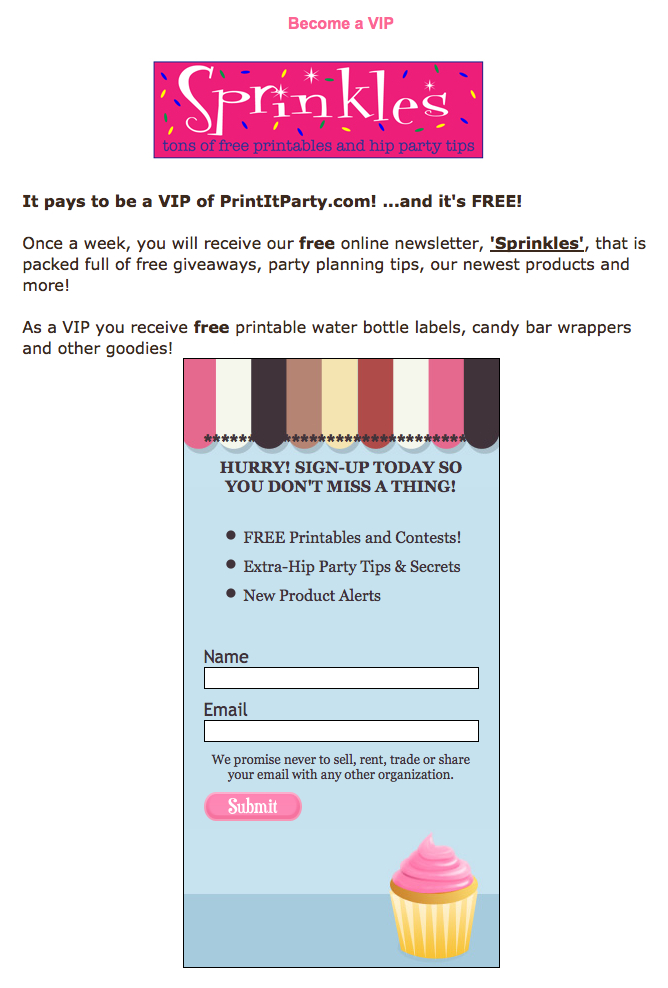
Let’s take a look at how Print It Party, a party decor site, sets expectations with their web form:

Print It Party Example thumbnailTo make certain that important details are not overlooked, they place information not only in the header of the form, but above the form as well. With your own form, if you can’t explain in full detail what subscribers will receive in just the header, include a description near the web form on the page.

This web form includes the benefits of what the subscriber will receive – “free printables and contests, extra-hip party tips and secrets and new products alerts.” They make their newsletter sound special and exciting while describing exactly what is to come.

Including a Subscriber Counter

Using a subscriber counter has shown to be a successful tool in gaining subscribers. A potential subscriber viewing the counter will see that others are benefiting from your newsletter. This establishes your information as a reputable source.

Battlefield Equipment, an equipment rental site, sets expectations using this method.

Battlefield Example thumbnailBattlefield Equipment’s subscriber counter builds trust and sets expectations about the quality of their “Battlefield Equipment eNewsletter.” Potential subscribers can see Battlefield already has a significant following and they will be more inclined to trust that the messages and content they will receive are valuable.

Just as Techbite describes when subscribers will receive messages, Battlefield notes that subscribers will get “seasonal” specials. If you do not send each week or month on a specific day, you can still use detailed words to describe “when” messages will go out.

Using Images

Including an image on your email sign up form can increase recognition and help you to maintain consistency throughout your campaign.

Take for example the web form on the homepage of the brain games and fitness company, Braintraining. Braintraining’s form includes imagery and lets subscribers know they respect their privacy.

Braintraining Example thumbnailTheir attention-grabbing lightbox form includes an image of the Brain Training Power Pack. Including this picture allows subscribes to visualize what they are going to receive.

The form also contains a link to Braintraining’s privacy policy. Include a link to the privacy policy in your own web form to assure subscribers that you are sending a safe and private newsletter.

Details Make the Difference

These forms do not simply say “Sign Up for My Newsletter.” They include valuable and descriptive information to begin an honest relationship with subscribers.

You can see a little detail goes a long way in setting expectations. To prevent potential complaints, make it your priority to set expectations right off the bat.

How do you set expectations at sign up?

Brought to you by Aweber

Seal the Deal: 10 Tips for Writing the Ultimate Landing Page

I have a client with a deep-pocket online media budget. Google Adwords PPC, banner ads on major news sites. We’re talking some sizable money to generate traffic and turn that traffic into customers. I bet you’re thinking a big part of their budget was earmarked for landing page development and testing. I would have thought so, too, before they became a client. But what I quickly discovered was this – there wasn’t a series of landing pages. There wasn’t even one landing page! All of the clicks, all of their costly PPC traffic was being directed to the homepage.

Literally, their best prospects were being dumped off at the front door with little direction or guidance as to how to proceed. Yikes.

Now just to be fair, literally any page of your site or blog is a landing page of a sort. To my mind, every page should be optimized to move your visitor along whatever path you’ve set forth toward a sale, a newsletter or blog subscription, what have you.

But for the purposes of this post, I’ll confine myself to those landing pages where your prospect initiated some sort of response to an ad. This could be a PPC (pay-per-click) ad like Google Adwords, a banner or text ad, or even an email. In this scenario, your prospect has initiated some sort of relationship with you. Your landing page acknowledges this and provides additional information – benefits/features – and a clear path to the next step.

So let’s look at 10 key steps to writing and designing a landing page that will help get you the results you’re looking for:

ON WRITING

1. Make sure your headline refers directly to the place from which your visitor came or the ad copy that drove the click. Match your language as exactly as you can. (Close is good, exact is best.) This way you keep your visitor oriented and engaged. This is by far the most important part of your landing page.

2. Provide a clear call to action. Whether you use graphic buttons or hot-linked text (or both), tell your visitor what they need to do. I use a minimum of 2 calls to action in a short landing page, 3-5 in a long landing page. Copy tests here will give you the biggest bang next to testing headlines.

3. Write in the second person – You and Your. No one gives a rat’s patootie about you, your company, or even your product or service except as to how it benefits him or her. (The bigger the company the more time I spend rewriting their stuff from We to You.)

4. Write to deliver a clear, persuasive message, not to showcase your creativity or ability to turn a clever phrase. This is business, not a personal expression of your art. (Every copy coaching student hears me say this at least once.)

5. You can write long copy as long as it’s tight. I always err on writing a little long on the first drafts because it’s easier to edit down than to pad up skimpy copy. Your reader will read long copy as long as you keep building a strong, motivating case for him/her to act. However, not every product or service will require the same amount of copy investment. Rule of thumb: Think longer copy when you’re looking to close a sale. Think shorter copy for a subscription sign-up or something that doesn’t necessarily require a cash commitment..

6. Be crystal clear in your goals. Keep your body copy on point as a logical progression from your headline and offer. Don’t add tangential thoughts, ancillary services, and generic hoo-hah. (Hoo-hah makes the client feel good but wastes the readers time.) Every digression is a conversion lost.

7. Keep your most important points at the beginning of paragraphs and bullets. Most visitors are skimming and skipping through your copy. Make it easy for them to get the joke without having to slow down.

8. In line with #7, people read beginnings and ends before they read middles. Make sure you keep your most critical, persuasive arguments in these positions.

9. Make your first paragraph short, no more than 1-2 lines (that’s lines, not sentences.) Vary your paragraph line length from here. It helps create visual dissonance and makes it easier to read your copy. And no paragraph should be more than 4-5 lines long at any time.

10. Write to the screen. Take a piece of paper and frame-out where your text, buttons, and design elements will go. Consider how much of your content will be seen “above the fold” or at the first screen. You can still go long and have visitors scroll downward. If so, you’ll want to make sure you repeat essential calls to action, testimonials and other components so no matter where your visitor is, an ACT NOW link or button remains is visible.

3 BONUS TIPS:

11. Remove all extraneous matter from your landing page. This includes navigation bars, visual clutter, and links to other sections. You want the reader focused solely on your copy, your supportive visuals, and the offer you’re making without being tempted to wander around the room.

12. Don’t ask for what you don’t need. Ask for only enough information to complete the sale or the desired action. This isn’t the time to conduct a marketing survey. Every question you ask, every piece of information you require will chip away at your response. Be judicious.

13. Assume nothing. Test everything.

These tips and techniques will get you started, but they just scratch the proverbial surface. Design elements are critical, too — color, images, layout — as well as video, audio, and other interactivity elements whose purpose is to more deeply engage the reader and boost response. They all merit a deeper look and testing where it makes sense.

Recommended Resource: The one book I recommend without reservation is Landing Page Handbook, How to Raise Conversions — Data & Design Guidelines. Published by Marketing Sherpa, this is a compendium of everything “landing page” that copywriters and designers should heed and study deeply. Not a cheap reference at $247, it is, however, the one to own if you’re serious about learning the science and technique behind great landing pages. (Alternatively, Try this Book by my friend Tim Ash)

Get more from Roberta Rosenberg at her blog, The Copywriting Maven.

Free Traffic Here.

Landing Page Optimization techniques and teaching.

Higher Landing Page Conversions: Paradox of Choice

Last week we talked about a simple problem with many landing pages: too many choices. It’s simple: despite what people think, that more choices are better, it generally proves to be completely incorrect.  Noted Psychologist Barry Schwartz wrote this in his book “The Paradox of Choice.” According to most economic situations, the Paradox of Choice basically says that at a certain point that too many choices is counterproductive. In direct response however, I believe that we need to take this to a totally different level and completely remove any choices in landing pages.

In Performance Based Marketing the idea is to drive a customer to a product and get them to buy that product immediately. There are no extra points given to how many people view your page and think about it, just on conversion rates. The payment is simple, as we all know: the more people who sign up or buy the product, the more money that is made. We only care about that conversion, that is the golden goose, that is the end-game.

However, when you drive a user to the website, and there is a “choice” often it will result in the user having to think about the product, have to consider if they really want the product.   This is especially important in PPC and email campaigns, where the person has already “made the choice” of clicking on the advertisement to get to that page. They are interested in the product, you’ve already done the hard part of sending them there, the next step is getting them to buy. If you give them another choice, they are going to question their initial choice of actually clicking on the advertisement.

For example, if you created an advertisement that said “Get a $5 Large Pizza” but then then landing page has a choice of 5 other pizzas of higher values, you’d think that perhaps people would say “hey, those are good deals too.” However, the very fact that you are presenting them with higher prices might make them reconsider the initial buy and they would go “Hmm.. maybe I want something else, maybe not a Pizza” while considering their buy.  If you want to sell something more expensive, you do the upsell after they have already bought the pizza and started the order. It’s simple, they start the order for the $5 Cheese pizza, start entering their info, then you offer them the additional choices of “perhaps you’d like for $1 more some Extra Cheese” or a “Coke for $2.50.”

In Education PPC campaigns, this actually is one of the biggest mistakes on conversions. I’ve cut and paste below two EDU PPC campaigns, both for criminal justice. One of them does much better, because of the lack of choice. The person has already chosen that they are interested in Criminal Justice, but for some reason one of the online universities thinks that it better for them to give them an additional choice. They feel incorrectly that “perhaps there are people who might want a different degree.” Maybe a small percentage will look over it and decide that they really want to go to nursing, but the vast majority were looking for criminal justice school because they were sincerely interested or were thinking about it as a possibility. The school might have created doubt in their mind that this was a good opportunity, because there are so many options and their next step may very well be to search for something else.

Next week I will bring up “fake choices” — where you basically make the user think they may have choices but really are only given them one choice. It may seem the opposite of what we just talked about, but its basically the same.

Stop Bing, Yahoo, Facebook and any other type of traffic advertising.
Don’t even spend time with SEO until you try this NEW form of FREE web traffic.

—–

Learn about Landing Page Optimization

Four common issues with landing pages

Four common issues with landing pages

According to my analysis, one of these four issues (if not all) were the most common causes of poor conversion rates. As you go through the list of issues below, try to relate them to your landing page (or homepage). Here are the four most common issues that affect conversion rate and sales:

  • Too-much text (without any apparent order and layout)
  • Headline that doesn’t tell what your product or service does (or, in other words, tangential headline)
  • Lack of a single prominent call-to-action (either there is none or there are too many)
  • Lack of social proof or ROI proof (who uses the service and what are the benefits)

Let’s analyze the issues one by one.

Issue #1: Too much text

Example of a homepage with too much text

I won’t be surprised about lack of sales and conversions if your page announces “Welcome to..” followed by a bunch of three paragraphs describing what the site is about. Nobody on the web has patience to read paragraphs after paragraphs about you are offering.
On the web, people scan for elements that catch their eye. And you get only first few seconds to answer two most important questions: a) what you are offering; b) why they may need it.

Example of a balanced webpage (text + images)

So, what you need is a proper balance between graphics and text. Some examples of how you can improve your landing page (by replacing some text):

  • Instead of extensive “How this works” (consisting of heaps of text), make a simple graphic detailing the process
  • Instead of writing “We make some of the best shoes in UK” followed by description of different kinds of shoes you make, show pictures of shoes you make
  • Instead of trying to stuff every piece of information from your site on one page, concentrate on a SINGLE objective (and replace most of the text by images, graphics, etc. – all neatly arranged).

Hiring a professional web designer will certainly help if you lack design skills. On a similar note, “visually appealing” pages are always seen as more credible than “crudely designed” pages. So, an investment in a good design will go a long way helping your sales and conversions.

Issue #2: Lack of descriptive headline

Example of confusing headline: “Changing how the world works”

As I hinted in the section above, visitors on your page are impatient. Within first 5 seconds, they want to know what your service does or you have lost a chance with him/her. As someone wise said: “Browser back button is your biggest enemy” (if you find the source of this quotation, please leave a comment). Never think that a visitor is going to spend minutes reading through all text on your page and then make his best guess of what you are offering. Instead, you should make the job easy for him. Have a big, bold descriptive headline as the first thing he should see.

Example of good headline: “Hire Online Workers to get the Job Done”

A descriptive headline also serves another important job: it *sticks* in the visitor’s brain as long as he stays on your website. Contrast this to the scenario where there is no helpful headline which a visitor can fall back on if your page gets too confusing (usually happens because we want to write about EVERY feature our site offers). Moreover, your visitor is usually distracted. Imagine a “busy-beaver” visitor chatting with friends on IM, doing a status update on Facebook/Twitter and on a call with his boss, all at once. Now imagine he stumbles on your website. Do you expect him to really understand what your site does without having a descriptive headline?

My advice is to avoid following kinds of headlines:

  • No-headline: no matter how bad it is, you should definitely have a headline of some kind
  • Visionary headline: avoid headlines such as “Welcome to the future of social media marketing”. Such headlines are usually vague and convey no information at all. And if you think it may excite visitors, read last section of this article (about social proof).
  • All focus on benefits: in the first version of Visual Website Optimizer homepage, we had a headline “Magical tool to convert visitors into customers”. While that headline tells about the benefits of the tool, it doesn’t talk about what the tool really is. So, we changed the headline to “World’s easiest A/B testing tool” and believe it is much better than the other one. (Can you come up with an even better one?)

In a nutshell, headlines should be short, concise and descriptive.

Issue #3: Lack of a single prominent call-to-action

Paradox of choice on a landing page. Out of three call-to-action buttons. which option to choose?

Call-to-action is a button or link that asks visitor to take a specific action. It may be a link to your signup form, plans and pricing page or the feature tour page. There are two specific issues related to call-to-action: a) either some sites don’t have any call to action button or b) some sites have too many call-to-action buttons. Once the visitor arrives on your page, thinks that you are credible (from your design), reads the descriptive headline and is finally convinced to spend some time on your site, what’s the next page you want him to see? That decision should not be left on visitor because only you know (and not him) which is the most relevant page that the visitor should be viewing next.

Example of single, prominent call-to-action: “Download WordPress”

If you don’t have a single call-to-action or have far too many call-to-action, visitor is likely to get confused what to next (since all links from your landing page/homepage seem to be of equal importance). Even if you have two prominent buttons (e.g. one of Learn More and other for the signup), try reducing it to one button. There is even a book titled: “Don’t make me think!” and that’s precisely the point I’m trying to make here. Don’t force your visitor to make a choice. By placing relevant call-to-action buttons on different pages of your site, you should gently guide him to the final goal (be it a signup, purchase, download, etc.)

Issue #4: Lack of social proof or ROI proof

Example of no social proof. Why should I bother about Twhirl?

So you make bold claims on your site. Of course, you think you are the “Best Twitter client ever”. But, unfortunately, making claims is easy. Any site can claim to be the “best” or “revolutionary” because those words are abstract. You may think your product is the best but if you are the only one in this world with that viewpoint, you are not going to convince anyone to try it out.

Humans crave for social proof. They want to know whole else is using this thing and how beneficial was it for them. Even if you design the most beautiful landing page but fail to include any social proof, your sales and conversions are going to suffer. Social proof can be shown in terms of testimonials, company logos, customer photos or case studies.

Example of social proof: we know Facebook, LA Times, etc. use Hootsuite. So it must be good, no?

It is understandable that if your site is just getting started, it may be hard to get any social proof because you may not have any customers. In that case, you need to have a convincing return-on-investment proof on your site. I’m not just talking about justifying investment of money but you also need to convince a visitor to invest time trying out your service or product. People crave for statistics and validation. So, you can perhaps do a small study or research on Internet to come up with metric of some kind highlighting usefulness of your service. (Example if you have a new social media monitoring service: 95% of business are talked about on the Internet, use MyShinyNewTool to talk to those invisible customers).

Another key point with regards to social proof is human emotions. People respond to concrete representations (say a customer video testimonial) in a much engaging way as compared to an abstract fact (say, 50+ companies from Life Sciences and Biotechnology industry use our software). This is not to say that facts in your social proof don’t work. They do. But you can always augment them with stories of individual customers and what your service did to them. (Case studies are a great way about doing that).

Pace Lattin

Conclusion

To re-iterate, if you want to increase sales and conversions on your landing page or homepage, you need to concentrate on fixing following issues:

  • Too-much text (without any apparent order and layout)
  • Headline that doesn’t tell what your product or service does (or, in other words, tangential headline)
  • Lack of a single prominent call-to-action (either there is none or there are too many)
  • Lack of social proof or ROI proof (who uses the service and what are the benefits)

Sponsored by PointClickTrack. Monetization Revisited. <— Point, Click, Make Moooolah.

Scrolling and Attention

Summary:
Web users spend 80% of their time looking at information above the page fold. Although users do scroll, they allocate only 20% of their attention below the fold.

In Web design, there’s much confusion about the “page fold” concept and the importance of keeping the most salient information within a page’s initially viewable area. (That is, in fact, the definition: “above the fold” simply means “viewable without further action.”)

During the Web’s first years, users often didn’t scroll Web pages at all. They simply looked at the visible information and used it to determine whether to stay or leave. Thus, in usability studies during that period (1994–1996), sites often failed if they placed important information below the fold as most users didn’t see it.

This reluctance to scroll made sense at the time, because people were used to having computers show all their choices. Dialog boxes, CD-ROM multimedia shows, and HyperCard stacks all worked that way, and didn’t require scrolling. (Although users sometimes encountered scrolling text fields, they didn’t need scrolling to see the commands and options, and could thus make all decisions from the visible info.)

In 1997, however, I retracted the guideline to avoid scrolling pages because users had acclimated to scrolling on the Web. This was a rare case in which usability guidelines changed quickly. Typically, usability findings are stable across many years: 80% of Web usability guidelines from the 1990s are still in force.

Today, users will scroll. However, you shouldn’t ignore the fold and create endless pages for two reasons:

  • Long pages continue to be problematic because of users’ limited attention span. People prefer sites that get to the point and let them get things done quickly. Besides the basic reluctance to read more words, scrolling is extra work.
  • The real estate above the fold is more valuable than stuff below the fold for attracting and keeping users’ attention.

So, yes, you can put information below the fold rather than limit yourself to bite-sized pages.

In fact, if you have a long article, it’s better to present it as one scrolling canvas than to split it across multiple pageviews. Scrolling beats paging because it’s easier for users to simply keep going down the page than it is to decide whether or not to click through for the next page of a fragmented article. (Saying that scrolling is easier obviously assumes a design that follows the guidelines for scrollbars and such.)

But no, the fact that users scroll doesn’t free you from prioritizing and making sure that anything truly important remains above the fold.

Information foraging theory says that people decide whether to continue along a path (including scrolling path down a page) based on the current content’s information scent. In other words, users will scroll below the fold only if the information above it makes them believe the rest of the page will be valuable.

Eyetracking Data

Last month, we conducted a broad eyetracking study of user behavior across a wide variety of sites. To investigate whether the “fold” continues to be relevant, I analyzed parts of the study with a total of 57,453 fixations (instances when users look at something on a page, typically for less than half a second).

To avoid bias, I only analyzed data from 21 users accessing 541 different Web pages, even though our full study was much larger. To convince you that I didn’t limit the data for nefarious reasons, let me explain why I excluded some parts of the study from the present analysis.

Because our research goal was to generate fresh insights for our annual conference seminars, we targeted large parts of the study to test:

  • sites with novel navigation features for the IA courses;
  • corporate blogs, interesting FAQs, etc., for the seminar on Social Features on Mainstream Sites and the two-day course on Writing for the Web; and
  • Web-based apps for the Application Design seminars.

For each specialized topic, it’s perfectly valid to target a study and test sites that have features that we want to investigate. For example, to gain insight into carrousels for our navigation seminar, we should track users’ eyes as they encounter carrousels. To do this, we simply ask them to use a site that happens to include a carrousel, but we don’t draw their attention to that design element.

When we deliberately ask people to test sites that contain particular design elements, we can’t conclude that their behavior is representative for average sites. Sticking with the carrousel example, people might well scroll less often than normal if the carrousel successfully keeps their attention on the upper part of the page.

Our study also featured a component that let users go to any site they wanted, for the sake of our broad-ranging seminar on Fundamental Guidelines for Web Usability. These non-constrained tasks are the source of the data I’m analyzing here, because they tested the regular websites people use, as opposed to sites we picked for their design features.

Attention Focused at the Top

The following chart shows the distribution of user fixations along stripes that were 100 pixels tall. The bars represent total gaze time, as opposed to the number of fixations. (In other words, two fixations of 200 ms count the same as one fixation of 400 ms.)

Bar chart of the distribution of gaze duration for Web page areas  100 pixels tall, starting at the top

Even though 5% of users’ total time is spent past the 2,000-pixel mark, they tend to scan information that far from the top fairly superficially: some pages are very long (often 4,000+ pixels in my sample), and thus this 5% of user attention is spread very thinly.

In our study, user viewing time was distributed as follows:

  • Above the fold: 80.3%
  • Below the fold: 19.7%

We used an eyetracker with a resolution of 1,024 × 768 pixels. These days, many users have somewhat bigger screens, and we’ve conducted many (non-ET) usability studies with larger resolutions. Although using a bigger monitor wouldn’t change my conclusions, it would somewhat increase the percentage of user attention spent above the fold simply because more info would be available in the initially viewable space.

Scrolling Behaviors

Sometimes, users do read down an entire page. It does happen. Rarely.

More commonly, we see one of the two behaviors illustrated in the following gaze plots:

Gaze plots of viewing behaviors on three very long pages that all  were scrolled almost to the bottom.
Gaze plots showing where three users looked while visiting pages during three different tasks (one test participant per page). Each blue dot represents one fixation, with bigger dots indicating longer viewing time.

On the left, the user scrolled very far down the page and suddenly came across an interesting item. This viewing pattern gives us many fixations that are deep below the fold. We often see this pattern for well-designed FAQs, though the best FAQs present the most frequently asked questions at the top (so that many users won’t need much scrolling).

The left gaze plot also illustrates another point: the last element in a list often attracts additional attention. The first few items are definitely the most important, but the final item gets more views than the one before it. (That’s also why the bar chart shows more attention to the 701–800 pixel area than to the 601–700 pixel area: the bottom of our study monitor fell within the former area.) The end of a list’s importance is further enhanced by the recency effect, which says that the last thing a person sees remains particularly salient in the mind. (We discuss the design implications of the recency and primacy effects in our seminar on The Human Mind and Usability.)

The two other gaze plots show more common scrolling behaviors: intense viewing of the top of the page, moderate viewing of the middle, and fairly superficial viewing of the bottom. (I picked examples where users scrolled more or less all the way down — often there’s no viewing of the bottom because users don’t scroll that far.)

It’s as if users arrive at a page with a certain amount of fuel in their tanks. As they “drive” down the page, they use up gas, and sooner or later they run dry. The amount of gas in the tank will vary, depending on each user’s inherent motivation and interest in each page’s specific topic. Also, the “gasoline” might evaporate or be topped up if content down the page is less or more relevant than the user expected.

In any case, user attention eventually peters out, and the further down the page users go, the less time they generally spend on each additional information unit.

The middle gaze plot shows a category page with 50 sofas:

  • The top 2 rows get about 5–10 fixations per sofa.
  • The next 4 rows get around 2–4 fixations per sofa.
  • The next 8 rows typically get 1 fixation per sofa.
  • The bottom 3 rows get 2 fixations for one sofa and no fixations for the remaining 7 sofas.

This is only a rough pattern, and users will deviate depending on the content. For example, the Cameon Loveseat and the Custom Hugo Loveseat both get 4 fixations despite being 2,750 pixels down the page. Presumably, the user found these two sofas particularly appealing.

Design Implications

The implications are clear: the material that’s the most important for the users’ goals or your business goals should be above the fold. Users do look below the fold, but not nearly as much as they look above the fold.

People will look very far down a page if (a) the layout encourages scanning, and (b) the initially viewable information makes them believe that it will be worth their time to scroll.

Finally, while placing the most important stuff on top, don’t forget to put a nice morsel at the very bottom.

Check out CPAWAY: The Leading Affiliate Network doing it Your Way!

—–
Jakob Nielson is the leading expert in Internet Usability

5 Landing Page Mistakes that Crush Conversion Rates

Sponsored by the Great Affiliate Team at AffiliateWise. Sign up Today!

A landing page is a place you send traffic when you really want some action. And no, this has nothing to do with Craig’s List personals. It can be a sales page, an email opt-in page, a video landing page, or even a content landing page designed to rank well in search engines. As you might have guessed, there are a lot of ways to screw these up. Here are five of the most common mistakes people make with their landing pages. More importantly, I’ll tell you how to avoid making them yourself.

1. Blowing the headline

Landing pages live or die by the quality of the headline. It’s your two-second chance to overcome the swift and brutal attention filters we’ve developed due to information overload and poorly-matched promises.

Often, a better headline alone will boost the effectiveness of your landing page, and even overcome some of the other mistakes below. Split-testing different headlines is relatively painless, and can bring you much higher conversions compared with multiple other tweaks.

2. Using your regular site design

Most of us who use content marketing as an attraction strategy use a content management system, such as WordPress. That means we’re using design themes for the visual presentation of our sites.

While your typical sidebar and header approach to a blog post is fine, when it comes down to traffic hitting a landing page with a singular focus on specific action, all of that extraneous stuff causes confusion, distraction, and reduced conversions. Lose the clutter and create the cleanest page possible when you want some action.

3. Asking for more than one thing

The idea that more choices make people happier has been proven to be a psychological fallacy time and again. This “paradox of choice” reveals that when given multiple options, the decision ends up being not to choose at all.

An effective landing page asks for one specific action, and that’s it. And don’t forget to actually clearly ask for that one specific thing, which is an even bigger conversion killer if you don’t.

4. Ignoring basic aesthetics

Why is it when some people decide to ask for some action, they lose their minds on the appearance of the page? Bad fonts, garish colors, cheap highlighting, and silly clip art do not make for better conversions in most cases. What they do is crush your credibility.

While using your standard blog theme is distracting and confusing in the landing page context, there’s no need to become the typographical equivalent of a carnival barker, either. Great landing pages use fonts, colors, and visuals that are tailored specifically to the audience and action you desire, thereby enhancing the experience and boosting conversions.

5. Being lazy

Did you know that web users spend 80% of their time above the fold? Does that mean people won’t scroll down the page? No, it just means you can’t take it for granted that they will (instead of leaving).

Don’t be lazy about grabbing and holding attention. Don’t assume everyone instantly “gets” the benefit of your offer the way you do. Don’t overestimate your credibility. In short, don’t drink your own Kool-Aid. Think about it from their perspective, and you’ll realize you might not be all that (until you unequivocally prove you are with compelling copy).

Learn how to get Free Mass Traffic

—–

About the Author: Brian Clark is founder of Copyblogger and CEO of Copyblogger Media. Get more from Brian on Twitter.

Discover The Secrets of Email Secret Sales

When we’re not “in the know,” it’s human nature to exercise our curiosity and seek out the truth. When we’re kept in the loop, we feel special and privileged.

Your email marketing can appeal to those emotions, too. You want subscribers to feel privy to select information about your company. After all, that’s one reason you have an email campaign in the first place – to keep customers and prospects in the loop.

By positioning promotions as “secrets,” you can create buzz and start a game of whisper down the lane with your subscribers, hoping they will spread the word to their friends who weren’t as lucky to hear from you first.

secret-tactic1

When it comes to secret persuasions, Bloomingdale’s certainly has the right idea.

For their first ever online secret sale, they rolled out invitations only to email subscribers. The beauty of this tactic? It’s not really secret at all. Bloomie’s wants their readers to forward the message to friends and chat the event up.

secret-bloomingdales

How You Can Do It:

At first glance, it may seem like Bloomingdale’s can execute this kind of campaign because they have hundreds of thousands of dollars to spend on email marketing. Looking closer, however, there’s no reason that you can’t have the same impact with your own campaign.

  1. Create a broadcast message that promotes a “secret” limited time event. Use urgent language to inspire quick clicks.
  2. You don’t have to make a coupon code or get technical about sales deductions. Notice that Bloomie’s never mentions a code, they just include a link to the “sale” page on their site.

secret-tactic2

Everyone loves scratch-off coupons. It’s like playing the lottery, but always winning!

Overstock offers email subscribers a virtual scratch-off coupon in this genius email. The added element of the unknown inspired me to click through and see what item I could get a good deal on that day.

secret-overstock

How You Can Do It:

  1. Pick an item on your site that you want to make the special sale item and copy the URL.
  2. Save the following coupon images to your computer, then upload one to your website and use it in your next email. Link it to the special sale item, and you have a mystery sale item instantly!

secret-tactic3

Rue La La’s Secret Suite invitation is another brilliant use of secrecy. The very idea of a guest list oozes exclusivity. If you’re not on the list at the hottest club in town, you’re not getting in, right?

secret-ruelala

How You Can Do It:

  1. You’ve already got your guest list, so the hard part’s complete.
  2. The trick is writing an email that uses language to paints a portrait of limited access. Using phrases like “under-the-radar” and “exclusive” lets your subscribers believe that they are special for receiving the email from you, which increases the odds that they will click through and purchase something from you.

Have You Ever Run a Secret Sale Campaign?

What kind of language did you use to inform subscribers of the sale? Were your emails successful? Share your experiences below!

Brought to you by Aweber


Can You Have More Sales, Too?

Helping over 90,000 businesses like yours raise profits and build customer relationships using AWeber’s opt-in email marketing software for over 10 years.

Take a Free Test Drive today!

New Do-Follow Article Submission Sites List

If you aren’t familiar with article writing for traffic, it is still one of the best ways to generate targeted traffic to your website about specific topics. If you are trying to write articles about education offers, not such a good idea, because the market is completely saturated, but if you have a new topic, especially a new trend topic, it could be a great way to get attention to your product or products. For affiliates, this can be a sure-fire method of generating traffic to a topic-specific blog. One guru will charge you money to get this list as part of his “secret” to how to do article marketing.  I’ve decided that it’s easier to give to you for free. Pace Lattin tells us what we need to do.

Of course, if you are going to do this, I highly recommend learning to write many articles or getting a really good article spinning program. If you are like many of us, here is a whole article spinning (rewriting program) and submission program that will do some of the work for you. Please note some people really hate article spinning, and some love it. Either way, if you want to take a little time out of your normal marketing techniques any long-time affiliate marketer will tell you that submitting articles is always a plus.

  1. articlesalley.com Page Rank 7
  2. suite101.com Page Rank 7
  3. ezinearticles.com Page Rank 6
  4. articlesbase.com Page Rank 6 (With 10 articles, will change to do-follow)
  5. articlecity.com Page Rank 6
  6. isnare.com Page Rank 6
  7. buzzle.com Page Rank 6
  8. helium.com Page Rank 6
  9. site-reference.com Page Rank 5
  10. articleslash.net Page Rank 5
  11. thewhir.com/find/articlecentral Page Rank 5
  12. a1articles.com Page Rank 5
  13. sooperarticles.com Page Rank 5
  14. searchwarp.com Page Rank 5
  15. articlesnatch.com Page Rank 5
  16. articlealley.com Page Rank 5
  17. articledashboard.com Page Rank 5
  18. selfgrowth.com/articles.html Page Rank 5
  19. ideamarketers.com Page Rank 5
  20. bukisa.com Page Rank 5
  21. goarticles.com Page Rank 4
  22. carolinaarticles.com Page Rank 4
  23. articlesfactory.com Page Rank 4
  24. articleclick.com Page Rank 4
  25. submityourarticle.com/articles/ Page Rank 4
  26. infobarrel.com Page Rank 4
  27. abcarticledirectory.com Page Rank 4
  28. upublish.info Page Rank 4
  29. e-articles.info Page Rank 4
  30. articlemonkeys.com Page Rank 4 (Now No-Follow)
  31. dime-co.com Page Rank 4
  32. web-source.net Page Rank 3
  33. EvanCarmichael.com Page Rank 3
  34. articlerich.com Page Rank 3
  35. amazines.com Page Rank 3
  36. articlewarehouse.com Page Rank 3
  37. acmearticles.com Page Rank 3
  38. article-buzz.com Page Rank 3
  39. fourpxarticles.com Page Rank 3
  40. articlebliss.com Page Rank 3
  41. articles.everyquery.com Page Rank 3
  42. thecontentcorner.com Page Rank 3
  43. affsphere.com Page Rank 3
  44. articlecell.com Page Rank 2
  45. articlestars.com Page Rank 2
  46. articlecube.com Page Rank 0
  47. articlecompilation.com Page Rank 0
  48. articlepool.com Page Rank 0
  49. 365articles.com Page Rank 0
  50. articlenexus.com Page Rank

Is Article Spinning a Waste of Time?

“Is Article Spinning a bad idea,” asks a reader.

By article spinning (sometimes known as article cloning) I assume that you’re referring to the practice of reformatting others’ articles in order to create content on your site and avoid penalties for duplicate content by the search engines.

Or perhaps you’re spinning your own article in a dozen ways to disguise the duplicate content.

Though you mention that you plan to do this manually, many use software programs that automatically replace words or phrases in an article with synonyms from some kind of database thesaurus. They also move blocks of content from their original position in an article to another position to make it appear that this is a different article.

Article spinning from others’ article is akin to scraping techniques in which websites pull content off of other websites and put it on their own to attract traffic. Because of massive scraping and repurposing of content, there is a huge amount of useless clutter that shows up in searches. You have, no doubt, gone to webpages that match your keywords, but all you find are a lot of Google AdSense ads and a few random paragraphs that are unhelpful. Yes, they sometimes achieve search results, but they are neither helpful nor relevant.

I don’t know if Google has an official position on article spinning. I do know that they are actively working to disallow scraping sites the ability to earn money using AdSense Ads and that they are trying to help their search clients find relevant material. Article spinning takes what is bad about search and makes it worse.

I oppose article spinning on several grounds.

  • Morally, it is wrong to use someone else’s work for your own benefit without permission or payment. It is stealing, even if it is thinly disguised.
  • Legally, much article spinning is in violation of copyright laws, which protect authors from “derivative” works that are based on their original work.
  • Educationally, writing clear, easy-to-understand articles is difficult enough. But when people replace words for close synonyms, they often distort the precise meaning intended by the author. The ignorant can’t tell the difference, perhaps, but the ignorant are not well-served by articles that are misleading. Switching the order of paragraphs or blocks of material to disguise the source obliterates the logical flow of an article. Computers can’t produce good articles. Neither can amateur re-writers and re-spinners who haven’t studied subjects carefully and precisely. Who is hurt? The reader who is desperately trying to learn.
  • Socially, the common good is impaired as people fill the Internet with scrapings, spinnings, and regurgitations. Knowledge isn’t increased, but hindered, and finding useful material becomes harder and harder.

It is important to note, however, that the line between rewriting an article and mindless article spinning is a fuzzy one. All writers learn from other writers, especially from the work of experts. Writing an article is often a reformulation of others’ ideas in your own unique way for your own unique audience. But honest writers usually indicate their reliance upon others’ insights in various ways.

Yes! By all means study a subject and, once you understand it, write an article about it. That’s article marketing at its best. But don’t take others’ work and just change a few words and paragraph positions. That’s not rewriting, but plagiarism. It makes hash out of what was once a perfectly good meal.

I know that teachers and professors are seeing more and more article spinning submitted to them as original papers. Sleazy students do it to manipulate their grades. After all, the end justifies the means. Sleazy Internet article spinners do it to artificially manipulate search rankings. After all, the end justifies the means.

William, I hope that as you investigate article spinning, you’ll conclude, as I do, that article spinners deserve an “F” on moral, legal, educational, and social grounds.

Dr. Ralph Wilson is an Internet marketing pioneer and author of a dozen books on Internet marketing, including Planning Your Internet Marketing Strategy, Report on Article Marketing, Guide to Search Engine Optimization, the Shopping Cart Report, How to Develop a Landing Page, and others.

Great Email Subject Lines Explained!

Despite repeated proclamations of its extinction, rumors of the death of email marketing have been greatly exaggerated — especially since email and social media are a powerful combination. You might not reach the average college freshman, but for slightly older types (you know, the ones with the money), email is still the way to go in many lucrative mainstream niches.

You must first, of course, get your emails read. And it all starts with the subject line.

Email subject lines are a form of headline. They perform the same function as a headline by attracting attention and getting your email content a chance to be read.

So, headline fundamentals still apply. But the context is different, with the email space having its own funky little quirks that need to be accounted for.

Here’s the good news — email also implies a special relationship with the reader; a relationship that will get more of your messages read, even with subject lines that wouldn’t work in other headline contexts. Let’s take a look back at headline fundamentals, the specifics that apply to subject lines, and the “secret sauce” that makes email your top conversion channel.

1. The Fundamentals:

When you’re writing your next subject line, run it through this checklist, based on the Four “U” Approach to headline writing:

  • Useful: Is the promised message valuable to the reader?
  • Ultra-specific: Does the reader know what’s being promised?
  • Unique: Is the promised message compelling and remarkable?
  • Urgent: Does the reader feel the need to read now?

When you’re trying to get someone to take valuable time and invest it in your message, a subject line that properly incorporates all four of these elements can’t miss. And yet, execution in the email context can be tricky, so let’s drill down into subject-line specifics for greater clarity.

2. The Specifics:

Beyond headline fundamentals, these are the things to specifically focus on with email subject lines:

  • Identify yourself: Over time, the most compelling thing about an email message should be that it’s from you. Even before then, your recipient needs to know at a glance that you’re a trusted source. Either make it crystal clear by smart use of your “From” field, or start every subject line with the same identifier. For example, with our own Internet Marketing for Smart People newsletter, every subject line begins with [Smart People].
  • Useful and specific first: Of the four “U” fundamentals, focus on useful and ultra-specific, even if you have to ignore unique and urgent. There are plenty of others who work at unique and urgent with every subject line — we call them spammers. Don’t cross the line into subject lines that are perceived as garbage. But do throw in a bit of a tease.
  • Urgent when it’s useful: When every message from you is urgent, none is. Use urgency when it’s actually useful, such as when there’s a real deadline or compelling reason to act now. If you’re running your email marketing based on value and great offers, people don’t want to miss out and need to know how much time they have.
  • Rely on spam checking software: We all know that certain words trigger spam filters, but there’s a lot of confusion out there about which words are the problem. Is it okay to use the word “free” in a subject line? Actually, yes. All reputable email services provide spam checking software as part of the service or as an add-on. Craft your messages with compelling language, let the software do its job, and adjust when you have to.
  • Shorter is better: Subject line real estate is valuable, so the more compact your subject line, the better. Don’t forget useful and ultra-specific, but try to compress the fundamentals into the most powerful promise possible.

3. The Secret Sauce:

Getting someone to trust you with their email address is not easy. Twelve years ago when I started in email publishing, people would sign up for anything remotely interesting.

No longer.

But if you do gain that initial trust, and more importantly, confirm and grow it, you can write pretty lame subject lines and people will still read your messages. Just as with that ditzy friend from high school who nonetheless always has something interesting to say, trust and substance matter most.

Don’t get me wrong, writing great subject lines combined with the more intimate relationship email represents is much more effective. And you have to get your initial messages read to establish the relationship in the first place. Regardless, your open rates will improve based on the quality of your subject line.

But there’s something special in this jaded digital age about being invited into someone’s email inbox. You just have to over-deliver on the value to ensure you’re a treasured guest who gets invited back.

The inbox can be a stressful place. How do you make it brighter?

Learn More About How to Generate Free Traffic Here.

4 Keys to Negotiating with an Affiliate Manager

Some affiliates like to fly “solo” and others prefer to utilize their Affiliate Manager’s knowledge and resources to maximize their opportunities and payouts. Over the years, I have had numerous negotiations with affiliates on offers and payouts. Before negotiating or discussing payouts, it is important for affiliates understand a networks business model and take full advantage of maximizing their relationship with the affiliate manager. Here are 4 keys to negotiating that I believe will create a “win-win” for both the network and the affiliate.

1. Understanding Margins
A network’s business model is similar to a manufacturer/distributor/retail sales chain. The Manufacturer (Advertiser) creates the product and utilizes the distributors (Network) resources and capital to generate sales through retail stores (Affiliate/Publisher). The network makes a margin for assuming the risk of acting as the middleman between the advertiser and publisher. Some affiliates receive payments daily or weekly which leaves the network assuming risk as most advertisers have longer net terms.

2.  Integrity
Just be open and honest! If you are interested in an offer and need a certain payout, then just ask. There have been times when I have told an affiliate that I couldn’t payout what they were requesting. Conversely, there have been instances when I approached management about giving a particular affiliate a certain payout with very slim margins. Bottom line, you have to be able to trust the affiliate manager and vice versa.

3. Capabilities/Results
Before entering any negotiation it’s imperative to know what’s important to you and what you’re willing to ‘give up’ for the sake of getting what you want. What’s the least you’re willing to accept in order to pick up the offer? Do your research and know what the going rates are. Let the affiliate manager know what type of results you anticipate and discuss any previous success or failures. There will always be “hot” offers, but you shouldn’t place all your focus on what’s hot. You know your business, what you’re good at and what you’re not.  Focus on what you know, and specialize in it.

4.  Communication
As I stated earlier, some affiliates prefer no or minimal communication with an affiliate manager which is perfectly fine. However, if you decide to actively work with an affiliate manager it is important to talk with the affiliate manager about your intentions. Communicate your goals, strategies and what you expect of the network and your affiliate manager. When it comes down to it we all have the same goal – to make money while not compromising our ethics. Be candid with your AM about your experience level. Everyone starts somewhere so don’t be shy; the affiliate managers job is to help you grow your business.

Keeping these four points in mind when talking and negotiating with your network affiliate manager helps foster a good working relationship and ultimately will create a long term relationship.

Colleen Darwent
is an affiliate manager
at RevenueStreet,
a division of TheMediaCrew
She loves affiliates big time.